
EzCreate · Video Editor Asset & Frame Prep · Checked 2026-11-19
AI Video Editor Visual Companion: 4K Cutouts, B-Roll Plates & Thumbnails
Short answer: When creators search for "ai video editor", "ai video editor free", or "free ai video editor", half the bottleneck is not cutting audio tracks—it is preparing clean visual plates: transparent speaker/product PNG overlays, 16:9 outpainted b-roll stills, unblurred 4K archival photos, and high-CTR thumbnails with legible text. EzCreate (ezcreate.org) is a browser AI visual frame studio (not a multi-track audio/MP4 timeline cutter) that pairs with CapCut, DaVinci Resolve, Premiere Pro, or iMovie: use our local browser Signature PNG tool and shot prompt builder free, preview 10MB files free, and export watermark-free 1K–4K PNG/JPG assets with pay-once packs at $19.90 Starter (500 cr / 30d) or $49 Plus (1,600 cr / 90d).
Published by EzCreate on ezcreate.org. Public pricing and free-tier export rules for CapCut, VEED, and DaVinci Resolve were checked on 2026-11-19; EzCreate edits and generates still frames, transparent PNGs, and shot prompts rather than cutting multi-track MP4 timelines.
- Honest scope: Cut your audio/video timeline free in DaVinci Resolve, iMovie, or CapCut—use EzCreate to produce the 4K visual stills, clean PNG overlays, and thumbnails those editors struggle to generate.
- Zero watermark on paid exports + free browser utilities: Extract handwritten signature overlays locally for 0 credits, compose b-roll prompts free, and export clean 4K PNGs with no recurring SaaS lock-in.
- Predictable pay-once pricing: $19.90 Starter pack (500 cr / 30d) or $49 Plus (1,600 cr / 90d)—skip stacking another $20–$55/month cloud editor subscription.
Upload & preview up to 10MB free in your browser. Hosted AI generation uses credits — pay-once Starter is $19.90 (500 credits, 30 days) and Plus is $49 (1,600 credits, 90 days) with zero auto-renewal.
Cloud AI Video Suites vs. Free NLE + EzCreate Pay-Once Visual Studio (2026-11-19)
Browser timeline editors often watermark free exports or gate AI background cutouts and 4K image generation behind recurring monthly seats. Splitting timeline cutting from AI frame generation keeps quality high and recurring bills at zero.
| Evaluation Point | Subscription Cloud Video Suites (CapCut Pro / Veeed / Descript) | EzCreate (ezcreate.org) |
|---|---|---|
| Timeline cutting & audio captions | Built-in browser multi-track timeline (free tiers often watermark or cap 720p/1080p) | Not a timeline cutter — pair EzCreate visual plates with free DaVinci Resolve, CapCut desktop, or Premiere |
| Free browser tools with no watermark | Many "free ai video editor" web apps stamp corner watermarks until you subscribe monthly | Free local Signature PNG extractor (/remove-background/signature, 0 credits), free shot prompt builder, and zero EzCreate watermark on all paid PNG/JPG exports |
| AI image & thumbnail generation | Generic single-model stock generator with limited text legibility | 13+ named models including Ideogram V3 (crisp thumbnail text), GPT Image 2, Nano Banana Pro & Flux 2 Pro |
| Transparent PNG cutout overlays | Still/sticker cutout tools frequently locked behind Pro monthly tiers | Dedicated /remove-background & /tools/ai-sticker-maker for crisp lower-third and PiP PNG overlays |
| 16:9 set extension & archival upscale | Basic crop/blur bars around vertical photos on widescreen timelines | Outpaint vertical photos to true 16:9 (/tools/ai-image-extender) and upscale stills to 4K (/image-upscale) |
| Billing model | Recurring monthly or annual seat subscriptions ($12–$55+/mo) | Pay-once credit packs: $19.90 Starter (500 cr / 30d), $49 Plus (1,600 cr / 90d), $149.99 Pro, $299.99 Max; optional plans from $9.99/mo yearly |
| Failed generation credit refund | Monthly quota burn varies by vendor | Exact credit cost displayed upfront; failed paid jobs automatically refund spent credits |
Public facts verified 2026-11-19. Competitor plans and quotas change over time — always confirm current terms on each vendor’s live pricing page.
Which Tool Handles Each Part of Your Video Production Stack
| Your Scenario | Best Starting Point | Why |
|---|---|---|
| Cutting MP4 clips, syncing voiceover, and burning subtitles for free | DaVinci Resolve (Free) or CapCut | Dedicated NLE timelines cut video and audio natively without per-minute browser lag. |
| Transparent PNG cutouts of hosts, products, or handwritten signature end-screens | EzCreate (/remove-background & /remove-background/signature) | Drop clean alpha-channel PNGs straight onto Track 2 of any video timeline. |
| Designing YouTube thumbnails & Reels covers with bold, spelled-right titles | EzCreate (/ai-image-generator with Ideogram V3 or GPT Image 2) | Pick exact named models tuned for typography and export crisp 16:9 or 9:16 covers. |
| Restoring blurry historical or client photos for documentary Ken Burns pans | EzCreate (/tools/old-photo-restorer + /image-upscale) | 4K upscaled stills let you push in 150% on a 1080p/4K video timeline without pixelation. |
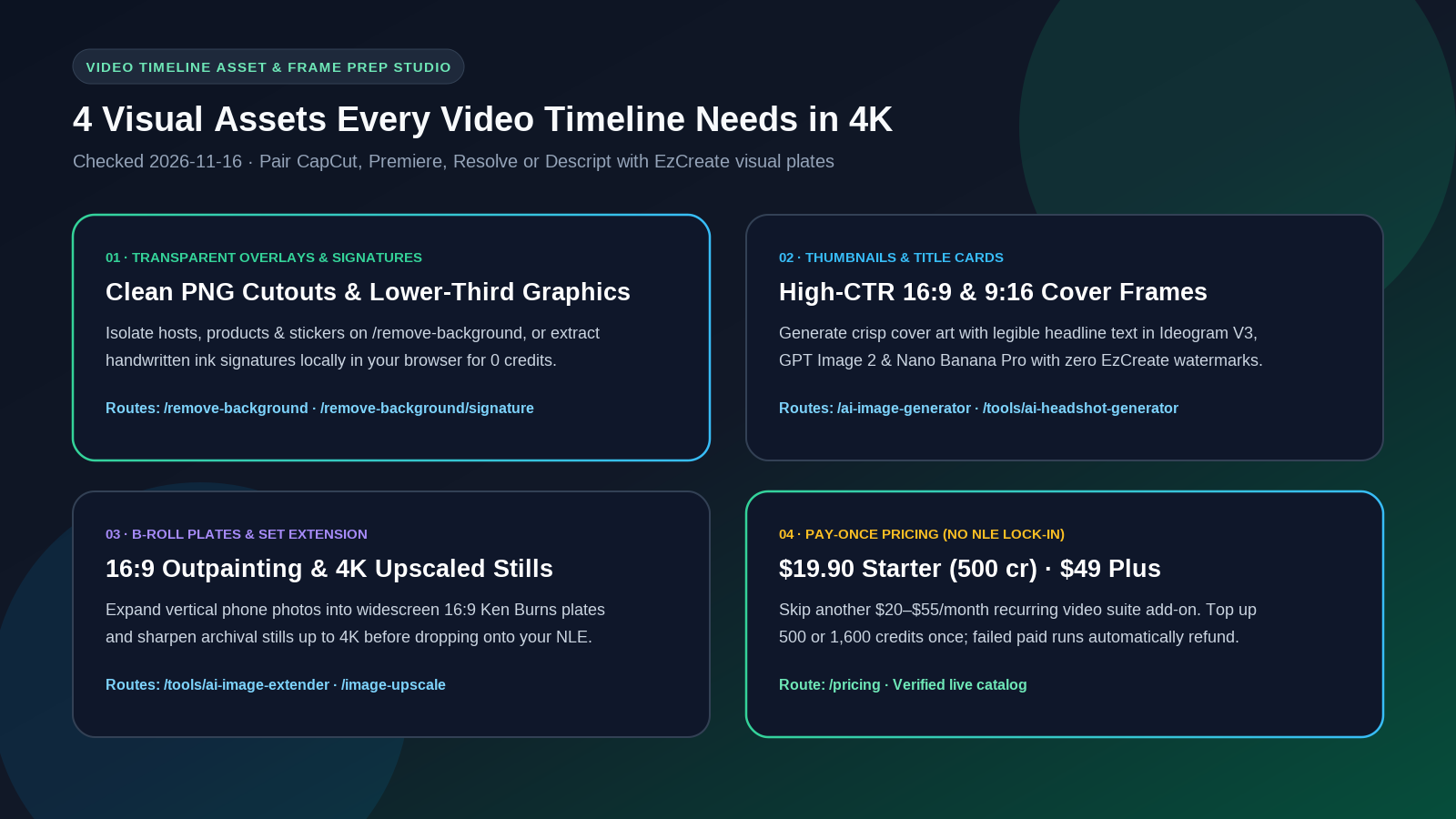
Build Timeline-Ready Visual Assets in 4 Direct Routes
Open any route in your browser, inspect your upload up to 10MB free, and export clean PNG or JPG plates ready for Track 1 and Track 2.
01 · Thumbnails & B-Roll Stills
Generate 16:9 & 9:16 Visual Plates
Create custom documentary illustrations, chapter cards, and YouTube thumbnails across 13+ named models.
02 · Track-2 Alpha Overlays
Cut Out Transparent Product & Host PNGs
Export clean cutout overlays for picture-in-picture callouts — plus 0-credit local handwritten signature PNGs.
03 · Ken Burns 4K Clarity
Upscale Stills for Zoom & Pan Cuts
Enlarge low-res screenshots and archival photos up to 4K so slow timeline push-ins stay razor sharp.
04 · Pay-Once Asset Packs
No Extra Monthly Video Suite Bill
Grab $19.90 Starter (500 cr / 30d) or $49 Plus (1,600 cr / 90d) with zero auto-renewal.
Transparent Credit Pack Math (Live Catalog, 2026-11-19)
Every model displays its exact credit cost on the Generate button before anything runs. One-time packs never auto-renew, and failed paid generations automatically restore spent credits.
Starter · Pay Once
$19.90
500 credits · valid 30 days · ~100 Nano Banana 2 (1K) or ~125 Seedream 4.5 images
Plus · Most Popular
$49
1,600 credits · valid 90 days · ~320 Nano Banana 2 (1K), ~160 2K edits, or ~200 GPT Image 2 runs
Pro · Pay Once
$149.99
5,500 credits · valid 90 days · priority speed across all text-to-image & edit models
Max · 1-Year Pack
$299.99
12,000 credits · valid 365 days · fastest generation speed for agency & seasonal catalogs
Interactive B-Roll & Thumbnail Prompt Builder for Video Editors
Pick a common video editor visual plate preset below, customize lighting and camera framing, copy a b-roll motion brief free, or load the still plate prompt into the live EzCreate workspace.
Step 1 · Choose a Storyboard Shot Preset
Step 2 · Camera Trajectory
Step 3 · Lighting Atmosphere
Step 4 · Format & Shot Pacing
1-Click Video Motion Prompt (Paste into Flow / Veo 3 / Seedance / Kling)
Single eight-second 16:9 widescreen shot: an overhead moody walnut desk with vintage ledgers, brass compass, and warm tungsten lamp shadows. Camera move: smooth motorized dolly push-in along a straight rail on a 35mm cinema lens. Lighting: controlled dual-softbox key light with crisp specular edge rim. Keep paper edges, wood grain, and lamp geometry razor-sharp across the frame; avoid cluttered gibberish text or lens distortion.Paired 4K Starting Keyframe Prompt (Run in EzCreate Below)
Create a crisp 16:9 widescreen starting reference keyframe for an image-to-video prompt: an overhead moody walnut desk with vintage ledgers, brass compass, and warm tungsten lamp shadows, controlled dual-softbox key light with crisp specular edge rim, razor-sharp textures, balanced composition, zero text gibberish, no watermark.Create a high-contrast 16:9 YouTube documentary b-roll plate: an overhead moody desk flat-lay with vintage financial ledgers, a brass magnifying glass, and warm tungsten desk lamp casting crisp shadows across dark walnut, 35mm editorial photography, sharp textures for slow timeline zoom-in, no text or watermark.Try the Live EzCreate Studio Right Here
Upload a source photo up to 10MB for free, apply the preset above, and check the exact credit cost chip before generating.
Honest Tradeoffs & Boundaries
- EzCreate is an AI image, cutout, and visual frame studio — it does not edit MP4 video timelines, trim audio tracks, or generate auto-captions.
- Free browser features include 10MB source previews, the local Signature PNG extractor (/remove-background/signature), and the prompt builder above; hosted AI image generation and 4K upscaling require sign-in and purchased credits.
- Uploaded and generated media in signed-in accounts are retained for up to 7 days for re-download and are never used to train AI models.
Frequently Asked Questions
- Is EzCreate a timeline MP4 cutter or a visual asset studio for video editors?
- EzCreate is a browser AI visual asset and frame studio—not a multi-track audio/MP4 cutter. Video editors pair EzCreate with free NLEs like DaVinci Resolve or CapCut to generate 4K b-roll plates, transparent PNG overlays, 16:9 outpainted stills, and watermark-free thumbnails.
- What can I do completely free on ezcreate.org without watermarks?
- You can extract transparent handwritten ink signature overlays locally in your browser at /remove-background/signature for 0 credits with no watermark, use the interactive shot prompt builder on this page free, and upload/inspect photos up to 10MB free before buying credits.
- How do EzCreate pay-once packs compare with monthly AI video editor add-ons?
- Instead of paying $15–$55 every month just to keep cutout and thumbnail credits active, EzCreate offers one-time packs: $19.90 Starter (500 cr / 30d) and $49 Plus (1,600 cr / 90d), with optional subscriptions from $9.99/month billed yearly.
- Which EzCreate tool fixes vertical phone photos for a 16:9 YouTube video?
- Open /tools/ai-image-extender to outpaint natural left-and-right scene margins into 16:9 widescreen, then run /image-upscale to export a crisp 2K or 4K PNG ready for Ken Burns pans.
- Are paid exports safe to use in monetized YouTube videos and client ads?
- EzCreate stamps zero watermarks onto paid PNG and JPG exports; commercial usage rights and user responsibilities for uploaded media are detailed in our Terms of Service at /terms-of-service.
Dated Sources (Verified 2026-11-19)
Ready to Run Your First Batch Without Subscription Lock-In?
Preview your upload free in the browser, then generate across 13+ named AI models with watermark-free 1K, 2K, and 4K exports.
Related Tools, Guides & Comparisons
Signature Transparent PNG Extractor (0 Credits)
Turn handwritten ink signatures into clean transparent PNG video sign-offs in your browser.
Old Photo Restorer
Repair archival family or historical stills for documentary video timelines.
Best AI Photo Editors Online Compared
Compare pay-once browser image studios against recurring design subscriptions.
Remove.bg Alternatives for Clean Cutouts
Evaluate transparent PNG cutout workflows for thumbnails, overlays, and product callouts.
EzMaker AI Alternative
Compare EzMaker AI’s unverified unlimited pitch against EzCreate’s 13+ named models, upfront credit meter, and 4K exports.
Photoroom Alternative for Product Photos
Clean white cutouts, AI lifestyle product scenes, and 4K marketplace exports for Shopify, Amazon, and Etsy sellers without mandatory monthly billing.
Canva AI Image Generator Alternative
Dedicated multi-aspect text-to-image and image-to-image generation across 13+ named models with background removal and 4K export.
Flow AI Video & Veo 3 Prep
Lock 4K starting frames, transparent PNG ingredients, and structured camera prompts before spending Google Flow / Veo 3 video credits.
Seedance Keyframe & Prompt Studio
Pair Seedream 4.5 / 5 Lite character stills and 1-click camera prompts in EzCreate for cleaner Seedance video runs.
Interactive AI Video Prompt Studio
Compose structured 6-block camera prompts free in your browser and generate matching 4K starting keyframes in one workspace.
Bulk Image Generator AI
Plan 1–200 SKU multi-ratio image batches, calculate exact credits across 7 named models, export formula-safe CSV briefs, and run renders in EzCreate.
All AI Image Tools Hub
Browse all 13+ focused AI image presets, instant browser tools, and restoration workflows.