
EzCreate · Flow AI Video & Veo 3 Keyframe Guide · Checked 2026-11-19
Flow AI Video & Veo 3 Keyframe Storyboard Studio: Lock 4K Frames First
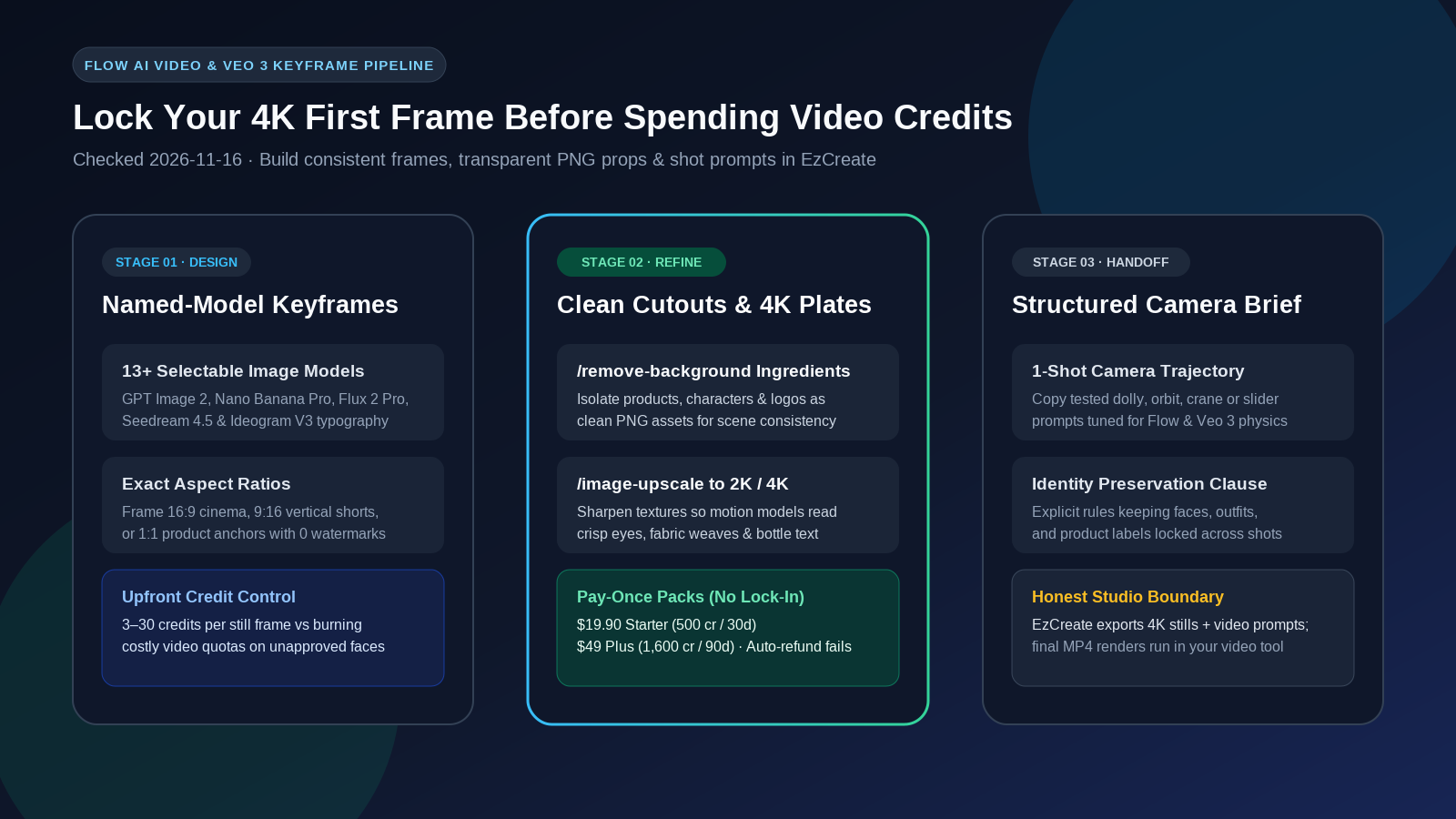
Short answer: Google Flow (powered by Veo 3 and Imagen ingredients inside Google AI Pro / Ultra subscriptions) shines at cinematic clip synthesis, but re-rolling raw prompts directly inside a monthly video quota quickly burns fast-generation credits when faces, outfits, or product labels drift. EzCreate (ezcreate.org) is a dedicated browser keyframe and storyboard studio: use our free interactive shot prompt builder below, preview uploads up to 10MB free, and generate 1K–4K watermark-free reference frames, transparent PNG cutouts, and clean scene plates across 13+ named models with pay-once packs starting at $19.90 Starter (500 credits / 30d) or $49 Plus (1,600 credits / 90d)—then hand your locked frame and prompt into Flow or Veo 3.
Independent workflow guide published by EzCreate on ezcreate.org (not affiliated with Google LLC, Google Labs Flow, or DeepMind Veo). Public Google Flow and Google One AI plan details were checked on 2026-11-19; EzCreate builds still keyframes, PNG cutouts, and structured video prompts rather than rendering MP4 video directly on this page.
- Honest division of labor: EzCreate crafts the exact 16:9 / 9:16 4K reference frame, product cutout, and camera-blocked prompt; Google Flow / Veo 3 animates the final MP4.
- Save costly video quota: Iterating character faces, legible Ideogram V3 signage, and lighting costs 3–30 image credits in EzCreate instead of re-rolling full Veo 3 video clips.
- Pay-once packs, zero subscription trap: Grab the $19.90 Starter pack (500 cr / 30d) or $49 Plus (1,600 cr / 90d), or optional plans from $9.99/mo yearly.
Upload & preview up to 10MB free in your browser. Hosted AI generation uses credits — pay-once Starter is $19.90 (500 credits, 30 days) and Plus is $49 (1,600 credits, 90 days) with zero auto-renewal.
Raw Google Flow Prompting vs. EzCreate Keyframe-First Prep (2026-11-19)
Google Flow calls reference images "ingredients" for good reason: supplying a sharp, pre-approved first frame dramatically stabilizes Veo 3 camera movement and character continuity.
| Evaluation Point | Google Flow & Veo 3 (labs.google/fx/tools/flow) | EzCreate (ezcreate.org) |
|---|---|---|
| Primary role in production | Google Labs filmmaking workspace rendering clips with Veo models | Browser AI image, keyframe & storyboard studio + free interactive shot prompt builder |
| Billing & entry commitment | Bundled with recurring Google AI Pro / AI Ultra monthly subscriptions (regional availability applies) | Pay-once credit packs: $19.90 Starter (500 cr / 30d), $49 Plus (1,600 cr / 90d), $149.99 Pro, $299.99 Max; optional plans from $9.99/mo yearly |
| Free browser tools (0 credits) | Requires eligible Google account & supported region | Free interactive 1-shot camera prompt builder on this page, free 10MB source preview, and free local Signature PNG extractor |
| Selectable still keyframe engines | Built-in Google image ingredient generation | 13+ named models: Nano Banana Pro, GPT Image 2, Flux 2 Pro & Flex, Seedream 4.5, Ideogram V3 & Character, Qwen Image |
| Packaging & title-card typography | Motion clips can soften or warp small label lettering | Lock razor-sharp signage & bottle labels in Ideogram V3 or GPT Image 2, then upscale to 4K PNG before animating |
| Background cutout & prop prep | Focused on scene assembly rather than surgical pixel cutouts | Dedicated /remove-background, /tools/remove-object-from-photo, and /tools/ai-image-extender for 16:9 / 9:16 plates |
| Output deliverable & watermark | Rendered video clips (SynthID / plan-dependent watermarking) | 1K, 2K, and 4K PNG or JPG still keyframes with zero visible EzCreate watermark + copyable camera prompt |
| Failed paid run protection | Managed under Google AI credit quota policies | Exact credit cost shown before clicking Generate; failed paid jobs automatically restore spent credits |
Public facts verified 2026-11-19. Competitor plans and quotas change over time — always confirm current terms on each vendor’s live pricing page.
When to Prompt Directly in Flow vs. When to Prep in EzCreate First
| Your Scenario | Best Starting Point | Why |
|---|---|---|
| Ambient B-roll where exact face or product identity does not matter | Prompt directly in Google Flow / Veo 3 | Generic clouds, ocean waves, or abstract textures rarely need a locked reference photo. |
| Multi-shot ad or short film needing the exact same protagonist or SKU bottle | Prep 4K Keyframes in EzCreate first | Lock facial structure, outfit seams, and label text across 4–8 cheap still frames before spending video credits. |
| Turning vertical 9:16 phone product photos into 16:9 widescreen Flow ingredients | EzCreate /tools/ai-image-extender + /image-upscale | Outpaint clean studio margins to 16:9 and sharpen to 4K PNG so Veo 3 never invents awkward side borders. |
| Writing camera-blocked prompts without subscription lock-in | EzCreate Free Shot Builder + $19.90 / $49 Pack | Compose camera trajectories free in your browser and buy one-time keyframe credits only when needed. |
4-Step Keyframe-to-Flow Prep Pipeline on EzCreate
Design and verify every visual ingredient in still form first so your first video render hits the brief.
01 · Design First Frame
Generate 16:9 or 9:16 Hero Keyframes
Compare Nano Banana Pro, GPT Image 2, Flux 2 Pro, Seedream 4.5, and Ideogram V3 side-by-side with exact 3–30 credit costs shown upfront.
02 · Isolate Ingredients
Clean PNG Cutouts for Scene Ingredients
Cut out products, presenters, and props onto clean transparent or studio plates ready to feed as visual ingredients.
03 · Sharpen to 4K
Upscale Keyframes Before Motion
Upgrade approved 1K drafts to crisp 2K or 4K PNGs so downstream motion models preserve iris detail and fine fabric weave.
04 · Pay Once, Zero Lock-In
Pick a One-Time Pack ($19.90 / $49)
Choose $19.90 Starter (500 cr / 30d) or $49 Plus (1,600 cr / 90d) with no recurring monthly charge.
Transparent Credit Pack Math (Live Catalog, 2026-11-19)
Every model displays its exact credit cost on the Generate button before anything runs. One-time packs never auto-renew, and failed paid generations automatically restore spent credits.
Starter · Pay Once
$19.90
500 credits · valid 30 days · ~100 Nano Banana 2 (1K) or ~125 Seedream 4.5 images
Plus · Most Popular
$49
1,600 credits · valid 90 days · ~320 Nano Banana 2 (1K), ~160 2K edits, or ~200 GPT Image 2 runs
Pro · Pay Once
$149.99
5,500 credits · valid 90 days · priority speed across all text-to-image & edit models
Max · 1-Year Pack
$299.99
12,000 credits · valid 365 days · fastest generation speed for agency & seasonal catalogs
Interactive Flow & Veo 3 Storyboard Shot Builder + Tested Keyframe Brief
Switch between four Flow/Veo-ready shot archetypes below, customize the camera rig and lighting mood, copy the video motion prompt for free, or load the paired keyframe prompt straight into our live image studio.
Step 1 · Choose a Storyboard Shot Preset
Step 2 · Camera Trajectory
Step 3 · Lighting Atmosphere
Step 4 · Format & Shot Pacing
1-Click Video Motion Prompt (Paste into Flow / Veo 3 / Seedance / Kling)
Single eight-second 16:9 widescreen shot: an industrial designer in an olive chore coat gently rotating a matte-black wireless speaker on a sunlit concrete workbench. Camera move: smooth motorized dolly push-in along a straight rail on a 35mm cinema lens. Lighting: controlled dual-softbox key light with crisp specular edge rim. Preserve exact facial features, olive coat stitching, speaker grille geometry, and desk props; avoid warped fingers, extra cables, or sudden jump cuts.Paired 4K Starting Keyframe Prompt (Run in EzCreate Below)
Create a crisp 16:9 widescreen starting reference keyframe for an image-to-video prompt: an industrial designer in an olive chore coat gently rotating a matte-black wireless speaker on a sunlit concrete workbench, controlled dual-softbox key light with crisp specular edge rim, razor-sharp textures, balanced composition, zero text gibberish, no watermark.Create a cinematic 16:9 starting keyframe for a Flow Veo 3 shot: an industrial designer in an olive chore coat inspecting a matte-black wireless speaker on a sunlit concrete workbench, soft morning volumetric window rays, 35mm cinema prime depth of field, crisp hardware buttons, natural skin texture, zero text artifacts, no watermark.Try the Live EzCreate Studio Right Here
Load the preset above or write your own brief, choose your aspect ratio and named model, and check the credit cost chip before generating.
Honest Tradeoffs & Boundaries
- EzCreate does not render MP4 video files on ezcreate.org and is not affiliated with Google Flow or DeepMind Veo 3; use this page to build your 4K still keyframes, transparent PNG props, and structured motion prompts.
- Source uploads and the interactive shot prompt builder above are free in your browser (up to 10MB per image), while hosted AI image generation requires a signed-in account and purchased credits.
- Even with a locked 4K keyframe, downstream video engines can still drift on complex multi-person choreography — keep each prompt focused on one clear 5-to-8-second camera move.
Frequently Asked Questions
- Does EzCreate generate Flow AI video MP4s directly on this page?
- No. EzCreate is an independent browser AI image and storyboard keyframe studio, not an official Google Flow or Veo 3 video renderer. Creators use EzCreate to build the 1K–4K starting frames, transparent PNG cutouts, and structured camera prompts that feed into Flow, Veo 3, or other video tools.
- Why generate keyframes in EzCreate before running Flow Veo 3?
- Iterating composition, wardrobe, and legible product text as still frames costs 3–30 image credits per run across 13+ selectable models—saving your high-cost video quota for approved shots that already look right at frame zero.
- Is the Flow & Veo 3 shot prompt builder on this page free?
- Yes. Switching presets, customizing camera trajectories and lighting, and copying the resulting video motion prompt in your browser costs zero credits and requires no card.
- How much do EzCreate one-time credit packs cost?
- Our live one-time packs start with the $19.90 Starter pack (500 credits, 30 days), followed by the featured $49 Plus pack (1,600 credits, 90 days), $149.99 Pro (5,500 credits, 90 days), and $299.99 Max (12,000 credits, 365 days). Optional subscriptions start at $9.99/month billed yearly.
- What happens if a paid keyframe generation fails?
- Every model shows its exact credit cost before you submit, and if a paid generation fails on our side, the spent credits are automatically restored to your balance.
Dated Sources (Verified 2026-11-19)
Ready to Run Your First Batch Without Subscription Lock-In?
Preview your upload free in the browser, then generate across 13+ named AI models with watermark-free 1K, 2K, and 4K exports.
Related Tools, Guides & Comparisons
AI Video Prompt Generator (/tools)
Focused one-shot image-to-video prompt guide and keyframe editor.
AI Image Extender (16:9 Outpainting)
Expand portrait or square product photos into widescreen 16:9 cinema frames.
Consistent Character Art Across Storyboard Scenes
Lock facial identity, wardrobe, and lighting across multi-shot storyboard frames.
Product Lifestyle Scenes From One Studio Photo
Place your real product SKU into agency-grade commercial environments without reshoots.
EzMaker AI Alternative
Compare EzMaker AI’s unverified unlimited pitch against EzCreate’s 13+ named models, upfront credit meter, and 4K exports.
Photoroom Alternative for Product Photos
Clean white cutouts, AI lifestyle product scenes, and 4K marketplace exports for Shopify, Amazon, and Etsy sellers without mandatory monthly billing.
Canva AI Image Generator Alternative
Dedicated multi-aspect text-to-image and image-to-image generation across 13+ named models with background removal and 4K export.
Seedance Keyframe & Prompt Studio
Pair Seedream 4.5 / 5 Lite character stills and 1-click camera prompts in EzCreate for cleaner Seedance video runs.
AI Video Editor Frame Prep
Prepare watermark-free 4K b-roll plates, transparent PNG overlays, and high-CTR thumbnails for any timeline video editor.
Interactive AI Video Prompt Studio
Compose structured 6-block camera prompts free in your browser and generate matching 4K starting keyframes in one workspace.
Bulk Image Generator AI
Plan 1–200 SKU multi-ratio image batches, calculate exact credits across 7 named models, export formula-safe CSV briefs, and run renders in EzCreate.
All AI Image Tools Hub
Browse all 13+ focused AI image presets, instant browser tools, and restoration workflows.