
EzCreate · Creator & Marketer Studio · Checked 2026-11-16
Canva AI Image Generator Alternative — Multi-Aspect Models & 4K Export
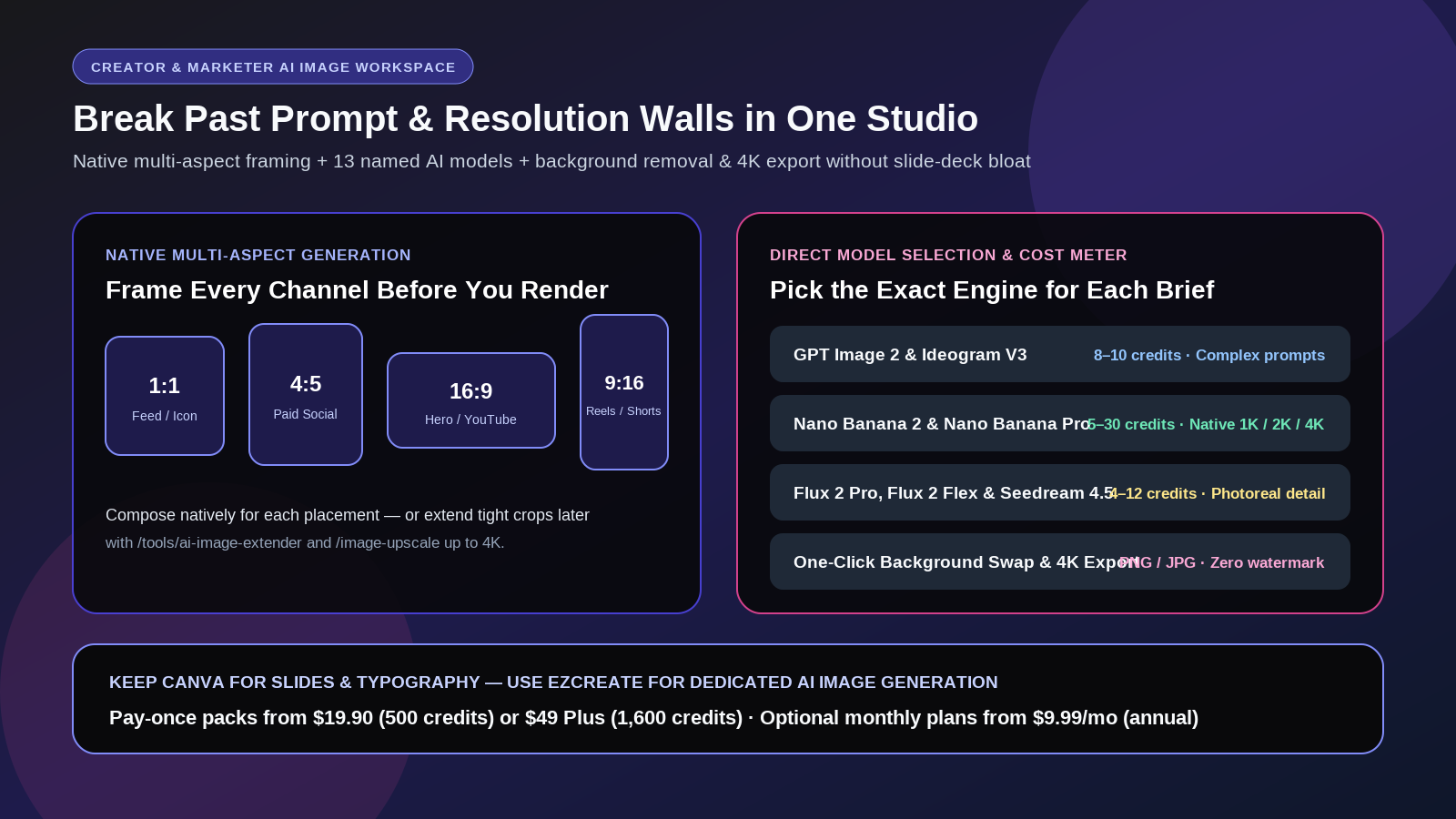
Short answer: Canva is unbeatable when you need slide decks, social typography, and team layout templates — and keep using it for layout. Creators and performance marketers look for a Canva AI image generator alternative when they hit monthly AI prompt quotas, fixed-square framing friction, or soft export resolution inside a design canvas. EzCreate gives you a dedicated multi-aspect AI image studio (/ai-image-generator) with 13+ selectable models (GPT Image 2, Nano Banana Pro, Ideogram V3, Flux 2 Pro, Seedream 4.5), source-image restyling, background swaps (/remove-background), and native up-to-4K exports (/image-upscale) on pay-once packs starting at $19.90.
Written by the EzCreate team on ezcreate.org. Canva plan and AI tool references reflect Canva’s public AI image generator and pricing documentation checked on 2026-11-16; verify current monthly AI usage allowances directly on canva.com.
- Direct engine choice instead of one suite black box: Switch per prompt between GPT Image 2, Nano Banana Pro, Ideogram V3, Flux 2 Pro, Seedream 4.5, and Qwen Image.
- Multi-aspect + native 2K/4K resolution: Compose natively for 1:1, 4:5, 16:9, or 9:16 and export crisp PNG/JPG stills up to 4K ready to drop straight back into Canva, Figma, or Premiere.
- Pay only for AI renders when a campaign hits: Buy a $19.90 Starter pack (500 credits, 30d) or $49 Plus pack (1,600 credits, 90d) without adding per-seat design suite subscriptions.
Upload & preview up to 10MB free in your browser. Hosted AI generation uses credits — pay-once Starter is $19.90 (500 credits, 30 days) and Plus is $49 (1,600 credits, 90 days) with zero auto-renewal.
Canva AI Image Generator vs. EzCreate Studio (2026-11-16)
Canva bundles AI generation inside a general graphic design suite; EzCreate is a focused AI image generation and photo-editing studio. Many teams pair both: generate clean 4K hero art in EzCreate, then set final ad copy in Canva or Figma.
| Evaluation Point | Canva Magic Media / Dream Lab | EzCreate (ezcreate.org) |
|---|---|---|
| Core product focus | All-in-one graphic design, presentation, and template suite with built-in AI apps | Dedicated AI image generator (text-to-image & image-to-image) and photo editing workspace |
| Selectable AI image models | Magic Media / Dream Lab style presets (Leonardo-backed on supported tiers) | 13+ named models side by side: GPT Image 2, Nano Banana 2 & Pro, Ideogram V3 & Character, Flux 2 Pro & Flex, Seedream 4 / 4.5 / 5 Lite, Qwen Image, Grok Imagine |
| Aspect ratios & outpainting | Preset aspect options inside canvas; Magic Expand gated to paid Canva plans | Multi-aspect framing in workspace + dedicated /tools/ai-image-extender for 16:9 / 9:16 banner expansion |
| Output resolution | Canvas export size; native AI tile resolution capped below dedicated 4K engines | Direct 1K, 2K, and 4K PNG or JPG generation on supported models + /image-upscale |
| Background removal & scene replacement | One-click BG Remover gated to Canva Pro / Teams | Included on the same credit balance via /remove-background & image-to-image mode (no Pro seat required) |
| Pricing & seat lock-in | Limited free AI lifetime/monthly allowance; recurring per-person Canva Pro/Teams subscription | Pay-once credit packs from $19.90 (500 cr / 30d) & $49 Plus (1,600 cr / 90d), or optional plans from $9.99/mo billed yearly |
| Typography, slides & vector layout | Full drag-and-drop multi-page layout, brand kits, and editable fonts | Not a slide/vector layout editor — generate clean text-free visuals here, then add copy in Canva or Figma |
| Watermark & failed-run policy | No watermark on standard AI generations; quota deducted per prompt rules | Zero watermark on PNG/JPG exports; failed paid generations automatically refund spent credits |
Public facts verified 2026-11-16. Competitor plans and quotas change over time — always confirm current terms on each vendor’s live pricing page.
When to Stay in Canva vs. When to Generate in EzCreate
| Your Scenario | Best Starting Point | Why |
|---|---|---|
| Building slide decks, PDFs, social carousels, and editable brand typography | Stay in Canva | Canva’s multi-page canvas, font pairing, and team brand kits are built for layout — AI image models should not replace real typography. |
| Hitting AI prompt caps or needing photoreal 2K/4K campaign hero visuals | EzCreate (/ai-image-generator) | Run GPT Image 2, Flux 2 Pro, or Nano Banana Pro at 2K/4K on a pay-once pack, then drop the crisp PNG straight into your layout. |
| Keeping character or product identity consistent across multiple ad angles | EzCreate Image-to-Image + Ideogram Character | Upload your anchor reference image and iterate scenes in image-to-image mode without losing subject continuity. |
| Turning one square visual into 16:9 YouTube thumbnails and 9:16 Reels backdrops | EzCreate Extender + 4K Upscaler | Generate new surrounding pixels with /tools/ai-image-extender and sharpen to 4K at /image-upscale. |
Build Campaign-Ready Visuals in One Focused Workspace
Skip digging through sidebar apps. Move from text brief to multi-aspect hero art, clean background variations, and 4K exports on a single credit balance.
01 · Multi-Aspect Generation
Text-to-Image & Image-to-Image Studio
Pick GPT Image 2, Ideogram V3, Flux 2 Pro, or Nano Banana Pro, choose your aspect ratio, and see exact credit cost before rendering.
02 · Clean Subject Isolation
One-Workspace Background Swap
Isolate products, founders, or illustrated mascots onto clean studio backdrops without paying for a recurring design-suite Pro seat.
03 · Print & Hero Sharpness
Native 2K & 4K Export Pipeline
Export high-DPI PNG or JPG visuals that stay razor-sharp on retina landing pages, YouTube thumbnails, and trade-show banners.
04 · Campaign-Friendly Billing
One-Time Credit Packs From $19.90
Top up $19.90 (500 cr) or $49 Plus (1,600 cr) for a launch sprint — zero per-seat subscription overhead when the campaign wraps.
Transparent Credit Pack Math (Live Catalog, 2026-11-16)
Every model displays its exact credit cost on the Generate button before anything runs. One-time packs never auto-renew, and failed paid generations automatically restore spent credits.
Starter · Pay Once
$19.90
500 credits · valid 30 days · ~100 Nano Banana 2 (1K) or ~125 Seedream 4.5 images
Plus · Most Popular
$49
1,600 credits · valid 90 days · ~320 Nano Banana 2 (1K), ~160 2K edits, or ~200 GPT Image 2 runs
Pro · Pay Once
$149.99
5,500 credits · valid 90 days · priority speed across all text-to-image & edit models
Max · 1-Year Pack
$299.99
12,000 credits · valid 365 days · fastest generation speed for agency & seasonal catalogs
Campaign Key-Visual Preset: Test Multi-Aspect Generation Now
Copy or load this art-direction brief into the live workspace below. Notice how leaving clean negative space gives you room to set sharp headline typography later in Canva, Figma, or Webflow.
Editorial commercial photograph of a minimalist matte ceramic coffee pour-over set on a sunlit warm oak table, soft architectural morning shadows on a plaster wall, generous clean negative space on the left third for headline layout, crisp natural textures, 35mm lens depth of field, rich color grading, no text, no letters, no logos, no watermark.Try the Live EzCreate Studio Right Here
Load the preset above or write your own brief, choose your aspect ratio and named model, and check the credit cost chip before generating.
Honest Tradeoffs & Boundaries
- EzCreate is not a drag-and-drop layout, presentation, or font editor: generate your clean visual without embedded text, then place headlines and logos in Canva, Figma, or Adobe tools.
- While Ideogram V3 and GPT Image 2 handle short display words better than older models, long body copy inside any AI image model still misspells words.
- Hosted generation requires a signed-in account and credits (upfront preview and upload inspection up to 10MB are free).
Frequently Asked Questions
- Does EzCreate replace Canva completely, or work alongside it?
- They complement each other. Canva is a layout and presentation suite; EzCreate is a dedicated AI image studio. Creators use EzCreate when they want named models (GPT Image 2, Nano Banana Pro, Flux 2 Pro, Ideogram V3), image-to-image continuity, background swaps, and 2K/4K PNG exports — then drop those finished visuals into Canva, Figma, or Webflow for typography.
- Do I need a monthly subscription to unlock background removal or 4K exports on EzCreate?
- No monthly subscription is required. Every one-time credit pack on ezcreate.org/pricing — starting at $19.90 Starter (500 credits, valid 30 days) and $49 Plus (1,600 credits, valid 90 days) — unlocks the same text-to-image, image-to-image, background removal, and 2K/4K export routes.
- Which AI image models can I choose inside EzCreate?
- EzCreate exposes 13+ named models in the workspace, including GPT Image 2 (8 credits), Nano Banana 2 (5/10/15 credits at 1K/2K/4K), Nano Banana Pro (10/18/30 credits), Ideogram V3 (10 credits), Ideogram Character (8 credits), Flux 2 Pro (12 credits), Flux 2 Flex (6 credits), Seedream 4 / 4.5 / 5 Lite (3–4 credits), Qwen Image (5 credits), and Grok Imagine (5 credits).
- Can I generate vertical 9:16, portrait 4:5, and widescreen 16:9 images?
- Yes. Select your target aspect ratio directly in /ai-image-generator before generating so the composition fits Reels/Shorts (9:16), paid social feeds (4:5 or 1:1), or hero banners and YouTube thumbnails (16:9) without awkward cropping.
- Can I export watermark-free PNGs for paid ads and client work?
- Yes. All PNG and JPG exports on EzCreate are watermark-free. Make sure you own rights to any reference image you upload and avoid trademarked third-party logos or celebrity likenesses.
Dated Sources (Verified 2026-11-16)
Ready to Run Your First Batch Without Subscription Lock-In?
Preview your upload free in the browser, then generate across 13+ named AI models with watermark-free 1K, 2K, and 4K exports.
Related Tools, Guides & Comparisons
AI Image Extender
Outpaint 1:1 visuals into 16:9 hero banners or 9:16 vertical ad frames.
T-Shirt & Merch Graphic Generator
Generate bold, isolated graphic motifs ready for cutout and 4K print prep.
Best AI Photo Editors Online Compared
Side-by-side look at browser AI editors, suites, and pay-once vs. subscription meters.
Consistent Character Art Across Scenes
Keep the same character, outfit, and style across storyboards and campaign variations.
Seasonal Campaign Images Without Reshoots
Refresh ad creatives for Black Friday, holiday drops, and new ad angles fast.
EzMaker AI Alternative
Compare EzMaker AI’s unverified unlimited pitch against EzCreate’s 13+ named models, upfront credit meter, and 4K exports.
Photoroom Alternative for Product Photos
Clean white cutouts, AI lifestyle product scenes, and 4K marketplace exports for Shopify, Amazon, and Etsy sellers without mandatory monthly billing.
Flow AI Video & Veo 3 Prep
Lock 4K starting frames, transparent PNG ingredients, and structured camera prompts before spending Google Flow / Veo 3 video credits.
Seedance Keyframe & Prompt Studio
Pair Seedream 4.5 / 5 Lite character stills and 1-click camera prompts in EzCreate for cleaner Seedance video runs.
AI Video Editor Frame Prep
Prepare watermark-free 4K b-roll plates, transparent PNG overlays, and high-CTR thumbnails for any timeline video editor.
Interactive AI Video Prompt Studio
Compose structured 6-block camera prompts free in your browser and generate matching 4K starting keyframes in one workspace.
Bulk Image Generator AI
Plan 1–200 SKU multi-ratio image batches, calculate exact credits across 7 named models, export formula-safe CSV briefs, and run renders in EzCreate.
All AI Image Tools Hub
Browse all 13+ focused AI image presets, instant browser tools, and restoration workflows.