
EzCreate · Interactive AI Video Prompt Studio · Checked 2026-11-19
AI Video Prompt Generator: Free 1-Shot Camera Builder & 4K Keyframe Studio
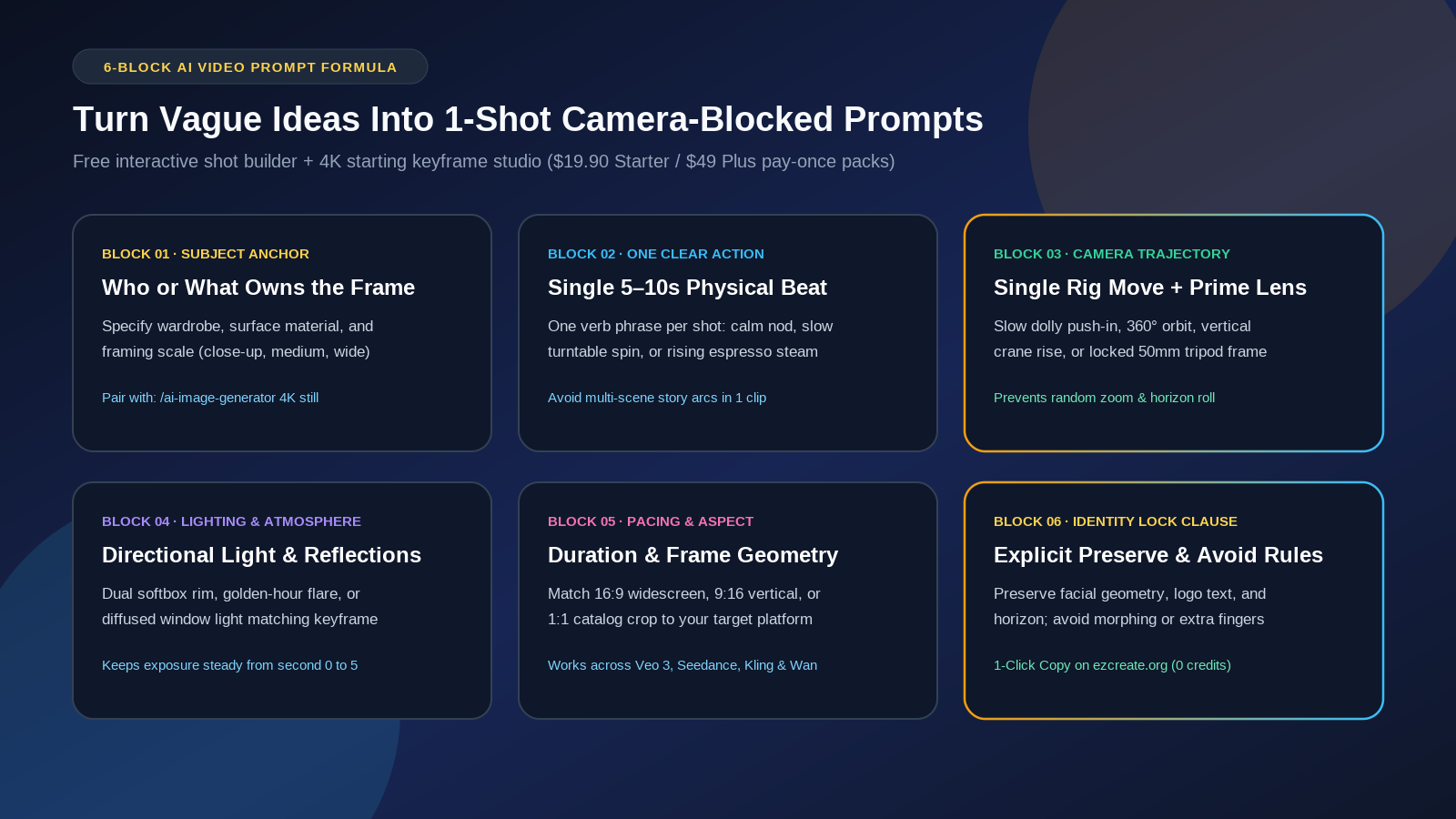
Short answer: Most failed AI video clips trace back to an overloaded or vague ai video prompt—either a three-word "make it cinematic" instruction that triggers random zoom jitter, or a multi-scene paragraph that causes faces and backgrounds to melt mid-shot. On this page you get an interactive 1-click AI video prompt builder completely free (0 credits, no sign-up) that structures Subject Anchor, Single Action, Camera Trajectory, Lighting, Aspect Pacing, and Identity Preservation—paired right alongside EzCreate’s live 13-model keyframe studio ($19.90 / $49 pay-once packs) so you can generate the exact 4K starting image before animating in Veo 3, Seedance, Kling, Runway, or Wan.
Built by the EzCreate team on ezcreate.org. Prompt engineering guidelines align with publicly documented camera and image-input recommendations from Google Veo, OpenAI Sora, and Runway checked on 2026-11-19. EzCreate builds the structured video prompt (free) and the still reference keyframe (credits); it does not render MP4 video on this page.
- 100% free interactive shot builder: Switch presets, pick camera trajectories and lighting, and copy ready-to-paste English video prompts with zero login or credit cost.
- One shot, six explicit blocks: Subject + Single Action + Camera Rig + Lighting + Duration/Aspect + Preserve/Avoid clause dramatically cuts wasted video rerolls.
- Generate the starting 4K keyframe in one click: Send your paired keyframe prompt straight into the live EzCreate editor below—backed by pay-once packs at $19.90 Starter (500 cr) and $49 Plus (1,600 cr).
Upload & preview up to 10MB free in your browser. Hosted AI generation uses credits — pay-once Starter is $19.90 (500 credits, 30 days) and Plus is $49 (1,600 credits, 90 days) with zero auto-renewal.
Generic Text-Only Video Prompts vs. EzCreate 6-Block Brief + 4K Keyframe (2026-11-19)
Across Veo 3, Seedance, Kling, Sora, and Wan documentation, vendor guides consistently emphasize two practices: describe a single continuous shot per clip and supply a clean reference image whenever identity matters.
| Evaluation Point | Vague 1-Line Prompts & Ad-Heavy Prompt Generators | EzCreate (ezcreate.org) |
|---|---|---|
| Prompt structure | Loose buzzwords ("8k, masterpiece, epic cinematic movement") with conflicting camera cues | Deterministic 6-block formula: Subject + 1 Action + 1 Camera Rig + Lighting + Aspect + Preserve/Avoid clause |
| Cost to build & copy prompts | Many prompt wrapper sites gate copy buttons behind email capture or daily paywalls | Free in your browser on this page & /tools/ai-video-prompt-generator — unlimited copies, no login required |
| Starting frame (keyframe) pairing | Text-only output; you still have to hunt down another image studio | 1-click "Load Into Live Keyframe Studio" button populates our 13-model 1K–4K image editor right on this page |
| Identity & label preservation | Rarely specifies what must remain static, causing face and logo drift | Every preset automatically appends explicit facial, typography, and horizon lock instructions |
| Reference cleanup & aspect prep | Not included in text prompt generators | Built-in /remove-background, /tools/remove-object-from-photo, and /image-upscale up to 4K PNG |
| Keyframe credit pricing | Separate monthly image & prompt SaaS subscriptions | Pay-once packs: $19.90 Starter (500 cr / 30d), $49 Plus (1,600 cr / 90d), $149.99 Pro, $299.99 Max; plans from $9.99/mo yearly |
| Failed paid run guarantee | Not applicable / varies | Upfront credit badge on Generate; failed paid keyframe runs automatically restore spent credits |
Public facts verified 2026-11-19. Competitor plans and quotas change over time — always confirm current terms on each vendor’s live pricing page.
How to Choose the Right Prompt + Keyframe Workflow for Your Shot
| Your Scenario | Best Starting Point | Why |
|---|---|---|
| You already have a clean product or portrait photo and only need the motion prompt | Use the Free Shot Builder below (0 credits) | Pick your camera move and lighting mood, copy the video motion prompt in one click, and paste it into your video model. |
| You need to invent a brand-new character or scene from scratch before animating | Shot Builder + EzCreate /ai-image-generator | Generate 4–6 fast 1K concepts in Nano Banana 2 or Seedream 4.5, pick the winner, and upscale to 4K. |
| Your reference photo has a cluttered background or photobomber | EzCreate /remove-background or /tools/remove-object-from-photo | Clean the reference frame first so your video model does not animate background distractions. |
| You want focused documentation on one-shot image-to-video prompt writing | Pair with /tools/ai-video-prompt-generator | Compare our concise tool preset with the interactive multi-preset camera composer on this page. |
Go From Blank Idea to Locked 4K Keyframe + Prompt in 4 Steps
Build the motion prompt free first, then optionally craft and upscale the exact starting frame in EzCreate.
01 · Render Starting Keyframe
AI Image Studio (13+ Named Models)
Turn the paired keyframe prompt into a 16:9, 9:16, or 1:1 reference image using GPT Image 2, Nano Banana Pro, Flux 2 Pro, or Seedream.
02 · Clean Reference Subject
Remove Background Clutter Before Motion
Isolate products or portraits onto clean studio plates so camera orbits stay focused and artifact-free.
03 · Lock 4K Sharpness
Upscale Approved Keyframes to 4K
Give Veo 3, Seedance, or Kling high-resolution eye, skin, and label detail at frame zero.
04 · Pay-Once Keyframe Packs
Buy Credits Once ($19.90 / $49)
Prompt building is always free; when generating keyframes, pick $19.90 Starter (500 cr / 30d) or $49 Plus (1,600 cr / 90d).
Transparent Credit Pack Math (Live Catalog, 2026-11-19)
Every model displays its exact credit cost on the Generate button before anything runs. One-time packs never auto-renew, and failed paid generations automatically restore spent credits.
Starter · Pay Once
$19.90
500 credits · valid 30 days · ~100 Nano Banana 2 (1K) or ~125 Seedream 4.5 images
Plus · Most Popular
$49
1,600 credits · valid 90 days · ~320 Nano Banana 2 (1K), ~160 2K edits, or ~200 GPT Image 2 runs
Pro · Pay Once
$149.99
5,500 credits · valid 90 days · priority speed across all text-to-image & edit models
Max · 1-Year Pack
$299.99
12,000 credits · valid 365 days · fastest generation speed for agency & seasonal catalogs
Interactive 6-Block AI Video Prompt Composer & Keyframe Switcher
Click any shot archetype below, mix and match five cinema camera trajectories and four lighting moods, optionally type your own subject, and copy either the Video Motion Prompt (free) or load the Paired 4K Keyframe Prompt straight into the live studio.
Step 1 · Choose a Storyboard Shot Preset
Step 2 · Camera Trajectory
Step 3 · Lighting Atmosphere
Step 4 · Format & Shot Pacing
1-Click Video Motion Prompt (Paste into Flow / Veo 3 / Seedance / Kling)
Single eight-second 16:9 widescreen shot: a ceramic pour-over coffee dripper atop a glass carafe on an oak counter as delicate steam rises from fresh bloom. Camera move: smooth motorized dolly push-in along a straight rail on a 35mm cinema lens. Lighting: controlled dual-softbox key light with crisp specular edge rim. Keep carafe glass rim, wood grain, and ceramic ribs completely stable; avoid liquid defying gravity or flickering steam.Paired 4K Starting Keyframe Prompt (Run in EzCreate Below)
Create a crisp 16:9 widescreen starting reference keyframe for an image-to-video prompt: a ceramic pour-over coffee dripper atop a glass carafe on an oak counter as delicate steam rises from fresh bloom, controlled dual-softbox key light with crisp specular edge rim, razor-sharp textures, balanced composition, zero text gibberish, no watermark.Create a crisp 16:9 starting reference keyframe for an image-to-video prompt: a ceramic pour-over coffee dripper atop a glass carafe on a sunlit oak counter as amber coffee blooms, soft morning window backlight catching delicate steam, 50mm prime shallow depth of field, sharp glass reflections, no text or watermark.Try the Live EzCreate Studio Right Here
Load the preset above or write your own brief, choose your aspect ratio and named model, and check the credit cost chip before generating.
Honest Tradeoffs & Boundaries
- The interactive prompt composer on this page is free and builds text prompts for external video models (Veo 3, Seedance, Kling, Runway, Wan); EzCreate does not render MP4 video files on ezcreate.org.
- Keep prompts to one continuous 5-to-10-second action and one dominant camera move—asking a video model for three scene cuts inside one prompt almost always degrades quality.
- Generating or upscaling the paired still keyframe in the live workspace below requires a signed-in account and purchased credits.
Frequently Asked Questions
- Is the interactive AI video prompt generator on this page really free?
- Yes. Switching presets, customizing camera moves, lighting, and custom subjects, and copying your finished video prompt or keyframe prompt costs 0 credits and requires no account.
- What makes a reliable AI video prompt for Veo 3, Seedance, or Kling?
- Describe one shot instead of a whole movie: anchor the main subject, specify one physical action, pick a single camera trajectory (such as a slow dolly push-in or 360 orbit), define lighting, and state what must stay unchanged.
- How does this page differ from /tools/ai-video-prompt-generator?
- Both are honest prompt-and-keyframe pages on ezcreate.org: /tools/ai-video-prompt-generator offers a concise single-shot guide inside our /tools catalog, while this campaign studio adds the interactive multi-preset 6-block camera/lighting composer and full credit comparison matrix.
- How much does it cost if I want to generate the 4K starting keyframe here?
- Uploading and previewing up to 10MB is free. When you want to generate or upscale keyframes, one-time credit packs start at $19.90 Starter (500 cr / 30d) and $49 Plus (1,600 cr / 90d), with optional subscriptions starting at $9.99/month billed yearly.
- What if a paid keyframe generation fails?
- You always see the exact 3–30 credit cost on the Generate button before running, and any paid job that fails on our side automatically restores the spent credits to your balance.
Dated Sources (Verified 2026-11-19)
Ready to Run Your First Batch Without Subscription Lock-In?
Preview your upload free in the browser, then generate across 13+ named AI models with watermark-free 1K, 2K, and 4K exports.
Related Tools, Guides & Comparisons
Concise AI Video Prompt Tool (/tools)
Quick-reference image-to-video prompt guide inside the /tools directory.
AI Headshot Generator
Create clean studio presenter portraits ready for talking-head video workflows.
Consistent Character Art Across Scenes
Maintain the exact same protagonist across every frame of your storyboard.
Photo to Painting & Stylized Print Prep
Control artistic style transfer and texture fidelity before animating stylized shots.
EzMaker AI Alternative
Compare EzMaker AI’s unverified unlimited pitch against EzCreate’s 13+ named models, upfront credit meter, and 4K exports.
Photoroom Alternative for Product Photos
Clean white cutouts, AI lifestyle product scenes, and 4K marketplace exports for Shopify, Amazon, and Etsy sellers without mandatory monthly billing.
Canva AI Image Generator Alternative
Dedicated multi-aspect text-to-image and image-to-image generation across 13+ named models with background removal and 4K export.
Flow AI Video & Veo 3 Prep
Lock 4K starting frames, transparent PNG ingredients, and structured camera prompts before spending Google Flow / Veo 3 video credits.
Seedance Keyframe & Prompt Studio
Pair Seedream 4.5 / 5 Lite character stills and 1-click camera prompts in EzCreate for cleaner Seedance video runs.
AI Video Editor Frame Prep
Prepare watermark-free 4K b-roll plates, transparent PNG overlays, and high-CTR thumbnails for any timeline video editor.
Bulk Image Generator AI
Plan 1–200 SKU multi-ratio image batches, calculate exact credits across 7 named models, export formula-safe CSV briefs, and run renders in EzCreate.
All AI Image Tools Hub
Browse all 13+ focused AI image presets, instant browser tools, and restoration workflows.